You stayed late again last Thursday. Not because the work demanded it, because you were sitting there manually adding up seven employees’ timesheets before Friday payroll. You made a mistake on Marcus’s overtime. You caught it. This time.
That’s the real cost of outgrowing your tools, not money, but the quiet anxiety that lives in the back of your mind every single pay period. Did I get everyone right? Did I miss something?
This guide breaks down exactly when that point arrives, what to look for in a time tracking tool, and which options make the most sense for different types of businesses in 2026.
Table of Contents
A Free Calculator Is the Right Tool When…
Before jumping to upgrades, it’s worth being honest about what a free calculator does well, because not every business needs software.
A free time card calculator is genuinely the right choice when you’re an individual employee verifying your own paycheck, a freelancer or contractor tracking hours for a single client invoice, a very small business with two or three workers who submit their own timesheets, or anyone who needs a quick calculation without installing software or creating an account.
For these situations, dedicated software adds cost and complexity without adding real value. The calculator does the job, use it.
Signs You’ve Outgrown the Calculator
You Manage Five or More Employees
Entering timecards manually for five or more people every pay period is slow, and every entry is a chance for a typo. Every correction costs time. And when someone forgets to submit their hours, you’re chasing them down instead of running payroll.
You Need GPS or Location Verification
A calculator accepts whatever times someone types in. It has no way to verify that a field worker was actually on site when they clocked in. For construction crews, delivery drivers, home health aides, and cleaning services, GPS clock-in is often essential for both accurate payroll and liability protection.
Your Payroll System Needs Direct Integration
If you run QuickBooks, ADP, Gusto, or Paychex, manually exporting a CSV and importing it every pay period adds a step that’s easy to get wrong. Direct integration removes that step entirely.
You Need Manager Approval Workflows
A calculator produces a document but has no workflow attached to it. There’s no approval button, no notification system, and no audit trail. If your business has any kind of approval process for timecards, you need software.
You Bill Clients by Project or Task
A timecard calculator totals hours worked, but it has no idea which client those hours belong to. Project-level time tracking connects hours directly to invoices. Without it, billing becomes a manual reconciliation exercise every single month.
You’ve Had a Wage Claim or Payroll Dispute
A dedicated time tracking system creates a timestamped, auditable record of every clock-in and clock-out. For businesses in California, where daily overtime rules are strict, this documentation is especially important.
What to Look for in Time Tracking Software
- Ease of use: Your team will only track time consistently if the tool is simple enough that they don’t resist it.
- Mobile access: Workers need to clock in and out from their phones.
- Payroll integration: Look for native integrations with QuickBooks, Gusto, ADP, or Paychex.
- Overtime rules: The software should support federal 40-hour weekly rules, California daily thresholds, or custom rules for alternative workweek schedules.
- Reporting: Clean data on hours by employee, department, and pay period.
- Compliance support: For California businesses, look for tools that handle daily overtime, meal break tracking, and the 7th-day rule automatically.
Best Time Tracking Tools for Different Business Types — 2026
Clockify — Best Free Option
Clockify is the go-to for small businesses that want to formalize time tracking without financial risk. Its free plan offers unlimited users, projects, and clients. Paid plans unlock approvals, advanced reporting, GPS tracking, and invoicing. Best for teams of one to ten people doing project-based work.
Free plan available. Paid plans from $4.99/user/month.
QuickBooks Time — Best for QuickBooks Users
If your business already runs on QuickBooks, QuickBooks Time is the natural pairing. The integration is seamless, tracked hours flow directly into payroll without any manual data entry. Supports mobile clock-in, GPS tracking, and scheduling.
Pricing: $20/month base fee plus $6/user/month.
Toggl Track — Best for Freelancers and Small Teams
Toggl Track is fast and easy to use. The free plan supports up to five users. Paid plans add billable rates, project time estimates, and scheduled reports. Best for freelancers, agencies, and teams that bill clients by the hour.
Free plan: up to 5 users. Paid plans from $10/user/month.
Homebase — Best for Hourly Teams and Shift Workers
Homebase combines scheduling, time tracking, and payroll in one app. Over 3.5 million small business employees use it. Best for restaurants, retail, and service businesses with hourly shift workers.
Free plan available for one location. Paid plans from $20/month.
Deputy — Best for Compliance-Heavy Industries
Deputy is built for businesses where labor law compliance is a daily concern, hospitality, healthcare, and retail. Includes time clock schedules & payroll integration.
Pricing: from $6/user/month.
Connecteam — Best All-in-One for Growing Teams
Connecteam combines time tracking with scheduling, team communication, training, and basic HR tools in one mobile-first platform. Designed for field teams, delivery drivers, and cleaning crews.
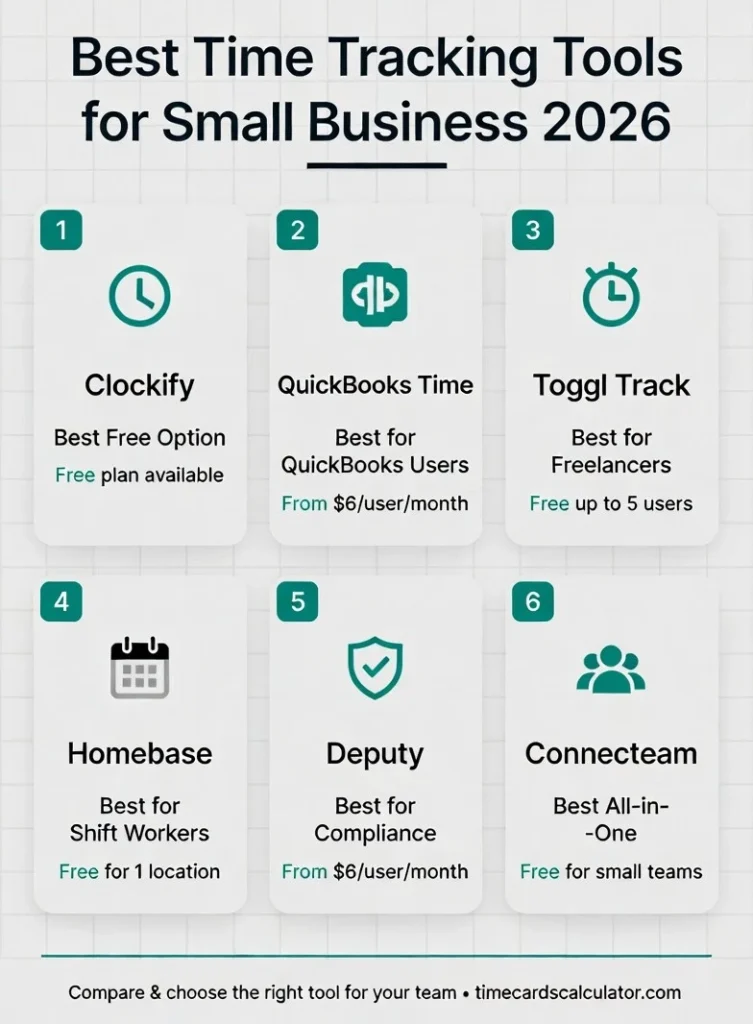
Free plan available for very small teams. Paid plans scale with team size.
| Feature | Free Calculator | Free Software | Paid Software |
|---|---|---|---|
| Hour calculation | ✅ | ✅ | ✅ |
| Overtime calculation | ✅ | ✅ | ✅ |
| Multiple employees | Manual entry | Automated | Automated |
| GPS clock-in | ❌ | Some plans | ✅ |
| Manager approvals | ❌ | ❌ | ✅ |
| Payroll integration | CSV export | Limited | Direct sync |
| Audit trail | ❌ | Basic | Full |
| Scheduling | ❌ | ❌ | ✅ |
| Cost | Free | Free | $4–$20/user/month |
Other Time Card Tools People Search For
Not every tool on the market is a full software platform. Some of the most searched time card calculators online are simpler, older free tools that a lot of workers still remember and look for. Here’s an honest look at what they are and where they stand in 2026.
Miracle Salad Time Card Calculator
Miracle Salad’s time card calculator was one of the most widely used free timecard tools online for years, particularly popular with hourly workers and payroll administrators who needed a quick, no-frills way to add up weekly hours. The interface was basic by design, a simple form where you entered time in and time out for each day, and it returned your total hours.
As of 2026, the tool is still accessible but hasn’t been updated in several years. It doesn’t support military time input, mobile devices, or overtime calculation beyond the basic 40-hour weekly rule. It still works for straightforward weekly totals if that’s all you need.
Dave’s Time Card Calculator
Dave’s time card calculator was another long-running free tool that many workers bookmarked for weekly use. Simple, fast, and reliable for basic hour totaling, it served its purpose well for single-employee, straightforward schedules.
The tool is no longer actively maintained and is difficult to find at its original location. If you relied on it, most of the alternatives in this guide cover the same basic function with additional support for lunch breaks and overtime.
Free Time Clock Wizard
Time Clock Wizard is an actively maintained free time tracking app, not just a calculator. It offers employee scheduling, time clock functionality for teams, and basic payroll reporting, making it closer to the software tools earlier in this guide (Clockify, Homebase) than to a simple standalone calculator.
The free plan supports multiple employees and includes a mobile app. Where it differs from a basic time card calculator is the setup required, you need to create accounts, add employees, and configure schedules before you can use it. For teams that need scheduling alongside time tracking, it’s worth a look.
Allied Time Calculator
Allied Time USA makes physical punch clocks and accompanying software for small businesses. Their calculator tools are tied to their hardware products rather than being standalone web tools, so if you’re already using Allied Time equipment, their software handles the data from your time clocks directly.
If you’re searching for a standalone browser based calculator independent of any hardware, Allied Time’s tools aren’t designed for that use case.
Red Court Time Calculator
Red Court’s time calculator was a straightforward browser based tool for adding up shift hours. Like several older free calculators, it handled basic time-in and time-out calculations without overtime logic or break deductions. The tool is no longer widely available.
The Honest Take on Free Calculators
The tools listed here range from genuinely free to a few dollars per user per month. If you’re looking at any of the tools above because you need a quick, free way to calculate hours and overtime without software setup or a subscription, our free time card calculator covers daily & weekly overtime, military time, break deductions, multiple employees, and it works on any device without an account. For anything beyond basic calculation, the dedicated software platforms earlier in this guide are the better fit.
Pricing information is based on publicly available data as of 2026 and may change. Always verify current pricing on each tool’s official website.
Frequently Asked Questions – FAQs
At what team size should I switch from a calculator to software?
Most businesses find manual timecard entry becomes unmanageable around five to seven employees. At that point, the time saved by automated collection typically outweighs the cost of a basic paid plan within the first month.
Are free time tracking tools actually useful?
Yes. Clockify and Toggl Track both offer free plans with genuine functionality for small teams. For a team under five people, the free versions of either tool are legitimately good.
Does time tracking software handle California overtime automatically?
Most do, but verify before you commit. Look specifically for support for daily overtime after 8 hours, double time after 12, and the 7th-day rule. Not every tool handles California rules correctly out of the box.
Can employees clock in on their phones?
Yes, for all the tools listed here. Mobile clock-in is a standard feature across Clockify, Toggl Track, QuickBooks Time, Homebase, Deputy, and Connecteam.
Is the data from time tracking software admissible in a wage dispute?
Timestamped records from a dedicated system with GPS verification and manager approval logs carry significantly more evidentiary weight than a downloaded calculator report.
Related: Free Time Card Calculator | Decimal Time Conversion |7 Minute Rule Explained | Timesheet Templates | California Overtime Rules