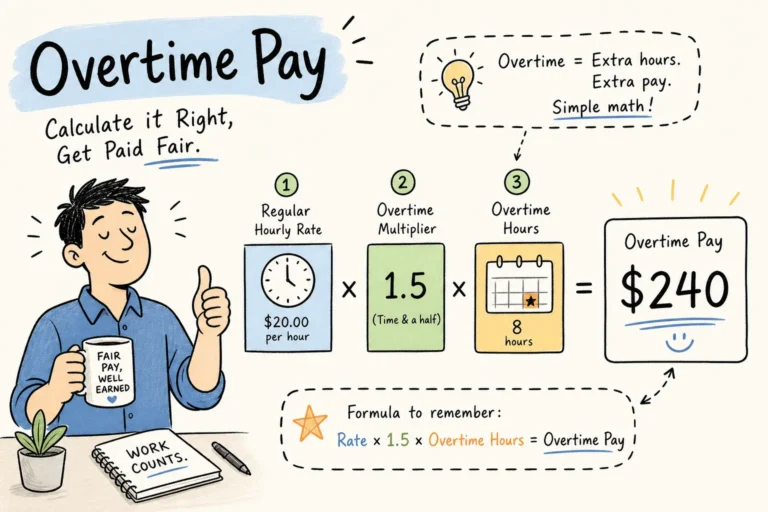
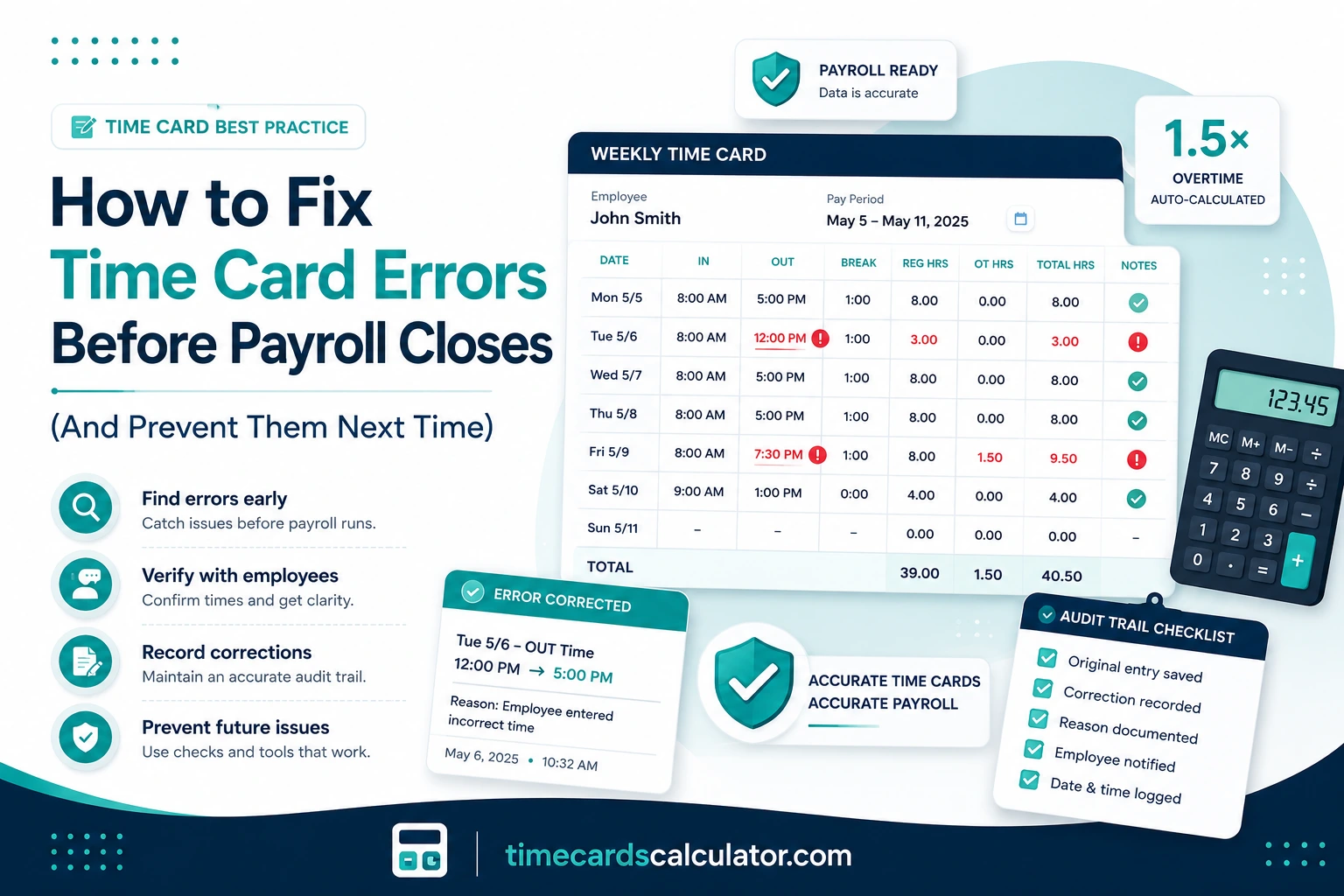
Quick Answer: When a timecard error is found before payroll closes, the correction process has three required steps: identify the specific error, contact the employee to verify the actual time, and record the correction with a documented reason and timestamp. That documentation is not optional. It creates the audit trail that protects both the employer and the worker from future disputes, and for government contractors, it is a mandatory requirement under DCAA guidelines. Altering time records without documentation, or to reduce wages and avoid overtime, violates the FLSA and can expose a business to back pay claims, double damages, and attorney fees.
Timecard errors & payroll mistakes happen. A missed clock-out on Tuesday, a lunch deduction applied automatically when the employee never actually took a break, a transposed digit that turns a 9-hour shift into a 19-hour one. The error itself is rarely the expensive part. What makes timecard corrections costly is handling them wrong, without a paper trail, without employee verification, or by quietly adjusting numbers after the fact in ways that cannot be explained later.
This guide covers the correct way to fix a timecard error before payroll closes, what the audit trail needs to contain, when DCAA requirements add additional obligations, and what policies prevent the same corrections from cycling back through every pay period.
Table of Contents
TimeCard Error Correction: What Changes and What Doesn’t
| Error Type | Correction Method | Documentation Required |
|---|---|---|
| Missed clock-in or clock-out | Add missing punch with verified actual time | Employee confirmation + reason note |
| Incorrect break deduction | Remove or adjust the automated deduction | Supervisor note confirming break was not taken |
| Transposed digit or wrong date | Correct the entry to verified actual time | Original entry preserved, correction logged with who changed it and when |
| Duplicate entry | Remove the duplicate, retain the original | Note confirming which entry was accurate |
| Wrong pay rate applied | Correct the rate, recalculate affected hours | Record showing original rate, corrected rate, and authorization |
| Overtime threshold miscalculation | Recalculate the full workweek, issue supplemental payment if needed | Corrected timecard with revised overtime total |
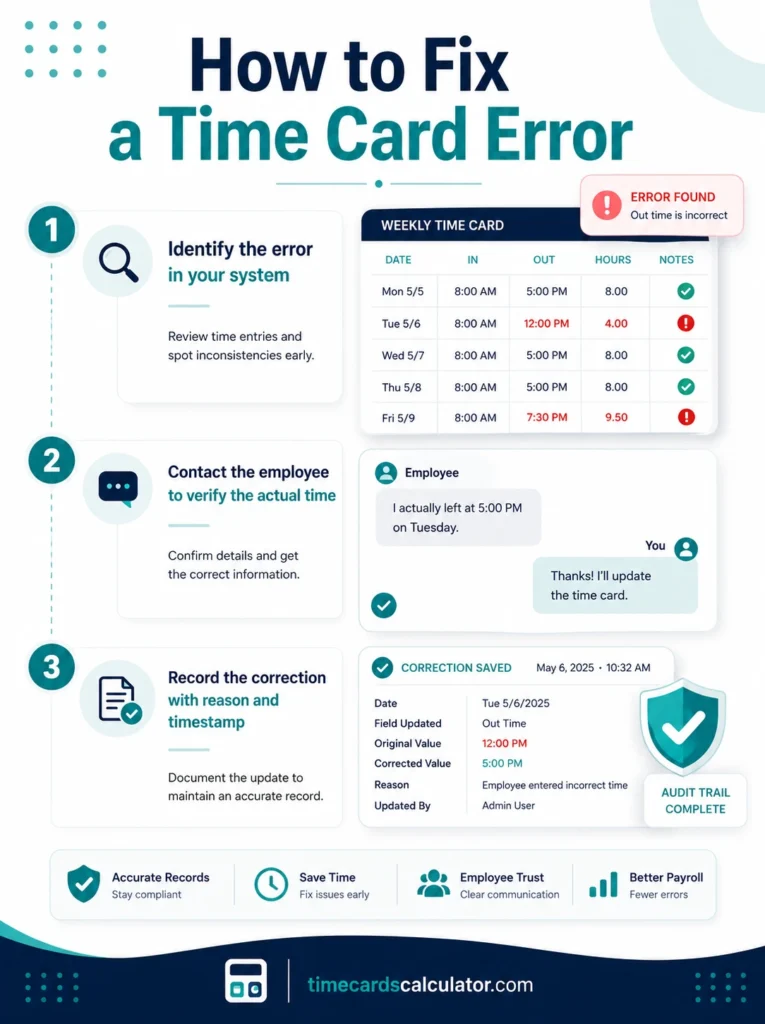
The Three Step Correction Process
Every timecard correction, regardless of how minor it seems, should follow the same sequence. Skipping steps is where the legal exposure comes from.
Step 1: Identify the exact error in the timekeeping system
Log into your timekeeping system and locate the specific entry that needs correction. Flag it as a timecard exception or pending correction so it doesn’t process as-is. Note the original entry including the time, date, and employee name before any changes are made. Some systems lock this automatically; if yours doesn’t, make a manual note of the original values.
Step 2: Contact the employee to verify the actual time
This step is non-negotiable, and it is the one most commonly skipped. Before changing any time entry, confirm the correct time directly with the employee. Ask them what time they actually clocked in, clocked out, or returned from break. For missed punches, a brief written confirmation from the employee (an email or a note in the timekeeping system) is the baseline. The goal is a record showing that the corrected time came from the employee, not from a manager’s estimate or assumption.
This matters for two reasons. First, it protects the employer if the correction is ever challenged. Second, it protects the employee from having time silently adjusted without their knowledge, which is itself a potential FLSA violation if the adjustment reduces their compensable hours.
Step 3: Record the correction with a reason and a timestamp
Document who made the change, when it was made, and why. Most digital timekeeping systems have a notes or reason field for exactly this purpose. The note doesn’t need to be long: “Employee confirmed 9:15 AM clock-in, missed punch due to system delay” is sufficient. What matters is that the original entry, the corrected entry, the timestamp of the correction, and the reason for the change are all preserved and retrievable.
The Department of Labor’s Wage and Hour Division treats contemporaneous, complete timekeeping records as the employer’s primary defense in any wage claim. An employer who can produce a documented correction log with employee confirmation is in a fundamentally different position than one who cannot explain why a time entry changed between submission and processing.
What the Audit Trail Actually Needs to Contain
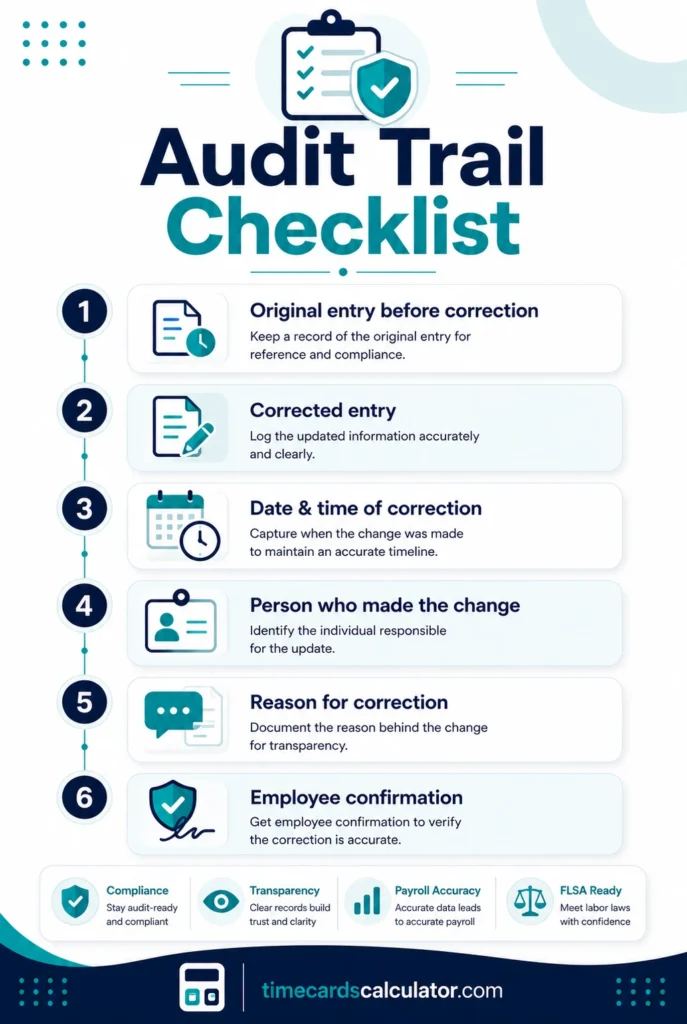
An audit trail is not just a log of what was changed. It is a record of why, by whom, and with what authorization. For any employer subject to a DOL audit or a wage dispute, the audit trail is the first thing a reviewing party asks for.
At minimum, every timecard correction should be documented with the original entry before correction, the corrected entry, the date and time the correction was made, the name of the person who made the correction, the reason for the correction, and confirmation from the employee that the corrected time is accurate.
For paper-based systems, this means a written correction form with both the employee’s and supervisor’s signatures, attached to the original timesheet. For digital systems, most platforms (ADP, Kronos, iSolved, Gusto) have a time management or exceptions module where corrections are entered with a note field and a change log that records the editor and timestamp automatically. If your system doesn’t log who made a change and when, that is a gap worth addressing before a dispute arrives.
The legal weight of a documented correction cannot be overstated. Altering time records to reduce wages, suppress overtime, or penalize workers violates the FLSA regardless of how it is framed. A visible, documented audit trail is the clearest protection against a DOL wage and hour investigation and against an employee bringing a private claim for back wages.
DCAA Requirements: When the Bar Is Even Higher
For businesses that hold federal government contracts, timecard correction isn’t just a payroll best practice, it is a legal compliance requirement under DCAA guidelines.
The Defense Contract Audit Agency audits labor charges to government contracts as part of its review of contractor costs. The DCAA’s timekeeping requirements, reinforced by the Federal Acquisition Regulation (FAR), require that every time entry be made contemporaneously (on the day the work is performed, not reconstructed later), that corrections be fully documented with the reason and authorization, that an audit trail showing the original entry and every subsequent change be maintained and retrievable, that timekeeping and payroll accounting functions be handled by different people (the person approving timesheets should not be running payroll), and that records be retained for a minimum of three years after the end of the contract.
DCAA floor checks, formally called MAAR 6 reviews, involve auditors interviewing employees directly about their timekeeping practices and verifying that what is recorded matches what actually happened. A pattern of undocumented corrections, late entries, or reconstructed timesheets is a red flag that can trigger a broader audit and, in serious cases, contract suspension.
For government contractors, the practical implication is that daily time entry is not optional. Employees should be logging time each day, not reconstructing a week at once on Friday. Managers who are accountable for meeting contract budgets should not be the same people initiating or approving employee time charges. And every correction, no matter how minor, should follow the documented three-step process above.
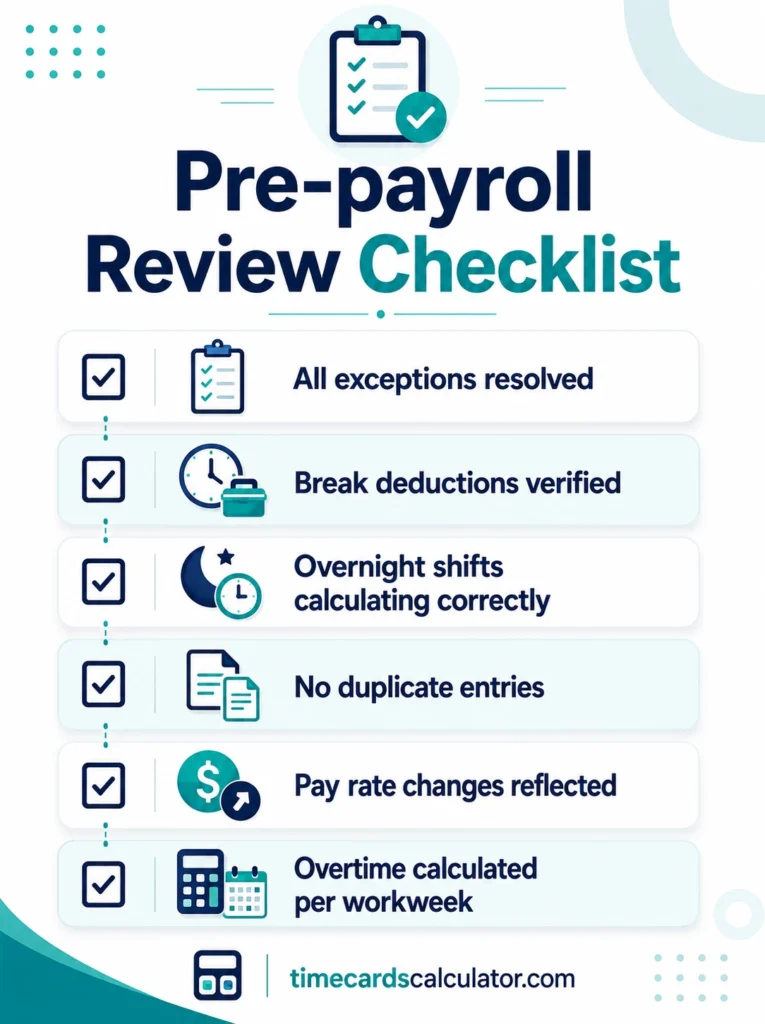
The Pre-Payroll Review Checklist
Most timecard errors that reach payroll should have been caught before payroll ran. A consistent pre-payroll review, run before every payroll deadline, is the single most effective structural change a small business can make.
The checklist should cover these items before processing begins:
Review all exceptions or flags in the timekeeping system and confirm every one is resolved. An unresolved exception that processes as-is is how errors reach paychecks.
Verify that break deductions match breaks actually taken. If your system applies automatic 30-minute lunch deductions, spot-check a sample of shifts to confirm the employee was actually off the clock.
Check that overnight shift hours are calculating correctly across midnight. A shift from 10:00 PM to 6:00 AM should total 8 hours. If the system is subtracting instead of adding, the error will be invisible until payroll runs.
Confirm no entries are duplicated from a sync issue or a manual entry made after the automatic import.
Validate that any pay rate changes during the period are reflected correctly, including mid-period raises, role changes, and shift differential assignments.
Check overtime totals for each workweek (not the pay period as a whole) against scheduled hours to flag anything that looks disproportionate in either direction.
For biweekly payroll specifically, verify that overtime is being calculated per workweek, not averaged across both weeks. This is the most common systematic payroll error in biweekly pay periods and it is invisible unless specifically checked. Our free TimeCard Calculator calculates each workweek independently by default.
Set a recurring calendar reminder before every payroll deadline. The review takes longer when it’s being done for the first time and rushed; once the habit is established, it takes 15 to 30 minutes for most small teams.
Supervisor Accountability: The Policy Layer That Prevents Repeat Corrections
Checklists stop errors from reaching payroll. Policies stop errors from being made in the first place.
The most effective single policy change for reducing repeat timecard corrections is requiring supervisor sign-off on every timecard before it reaches payroll, paired with explicit accountability: supervisors are responsible for the accuracy of every timecard they approve.
This policy should define what constitutes a timekeeping violation, prohibit any employee from altering another worker’s time records, and include a certification statement on each timecard confirming that the recorded hours are accurate and complete. Without that accountability layer, corrections become a recurring cycle managed by payroll staff rather than a prevented problem managed at the source.
Training matters as much as the policy document. Employees who don’t understand what counts as compensable time, when they are required to log time, or how to report a missed punch will continue generating exceptions. Annual timekeeping training, with a signed acknowledgment kept in the employee’s personnel file, is standard practice for DCAA compliance and a reasonable baseline for any employer running hourly payroll.
In Short
Fixing a timecard error correctly means three things: identify the error in your system before it processes, get written confirmation from the employee of the actual time, and document the correction with a reason, a timestamp, and the name of the person who made the change. The documentation is not administrative overhead. It is the difference between a correction that is legally defensible and one that exposes the business to a wage claim. For government contractors, DCAA requirements layer additional obligations on top, including daily time entry, segregated approval and payroll functions, and minimum record retention of three years. A pre-payroll review checklist and a supervisor accountability policy prevent most of the corrections that would otherwise need to be made.
Frequently Asked Questions
How do I correct a missed punch on a timecard?
Locate the missing entry in your timekeeping system and add the correct time based on direct confirmation from the employee. Do not estimate or assume the time without asking the employee first. Document the correction with a reason note, the timestamp of the change, and the name of the person who made the correction. In digital systems like ADP, Kronos, or iSolved, this is typically done through the time management or exceptions module.
Can an employer change an employee’s timecard without telling them?
No, not legally. Making changes to an employee’s time records without their knowledge or consent, especially if those changes reduce compensable hours or suppress overtime, violates the FLSA. Every correction should be made with the employee’s confirmation of the accurate time, and that confirmation should be documented.
What is an audit trail for timekeeping, and why does it matter?
An audit trail is a documented record of every time entry, correction, and approval in the timekeeping system, including who made each change, when, and why. It matters because the Department of Labor treats timekeeping records as the employer’s primary evidence in any wage dispute. An employer who cannot produce a clear audit trail for a disputed correction is at a significant disadvantage in a DOL investigation or employee wage claim.
What are DCAA timekeeping requirements for government contractors?
DCAA requires that time be entered daily (contemporaneously), that all corrections be documented with reasons and authorization, that an audit trail be maintained showing original and corrected entries, that timekeeping and payroll functions be handled by different people, and that records be kept for at least three years after contract completion. Floor check audits (MAAR 6) can include direct interviews with employees about their timekeeping practices.
What should a pre-payroll review checklist include?
At minimum: all timecard exceptions resolved, break deductions verified against actual breaks taken, overnight shifts calculating correctly, no duplicate entries, pay rate changes reflected accurately, overtime calculated per workweek (not per pay period), and a check that biweekly overtime is not being averaged across both weeks. Run this before every payroll deadline, not after.
Is it illegal to alter time records to avoid paying overtime?
Yes. Altering time records to reduce wages, suppress overtime, or avoid FLSA obligations is a violation of federal law regardless of how it is framed or documented. Employers who do this face back pay claims, liquidated damages equal to the unpaid amount, attorney fees if the employee prevails, and potential civil penalties from the DOL.
How long does an employer have to keep time records?
Under the FLSA, employers must retain payroll records for at least three years and the records used to compute wages (timecards, work schedules, wage rate tables) for at least two years. Government contractors working on Department of Defense contracts must retain records for a minimum of three years after the last payment on the contract.
What happens if a timecard error is not caught before payroll runs?
The employer must issue a supplemental or corrected payment for the affected pay period. If the error caused an underpayment of overtime, the supplemental payment must include the correct overtime rate, not just the missing straight-time hours. If the error was systematic (affecting multiple employees or multiple pay periods), the DOL can require back pay going back two or three years depending on whether the violation was willful.
What is the difference between a discretionary and nondiscretionary timecard correction?
In timekeeping context, this distinction refers to whether a correction was based on documented employee verification (defensible) or made at a manager’s sole discretion without employee confirmation (legally vulnerable). A correction that cannot be traced to an employee-confirmed time is difficult to defend in a dispute.
How does supervisor sign-off reduce timecard errors?
When supervisors are required to review and sign off on every timecard before payroll, errors that would otherwise reach processing are caught at the source. Pairing that sign-off with explicit accountability (supervisors are responsible for errors on timecards they approve) creates an incentive to review carefully rather than approve automatically. Combined with a certification statement from the employee on each timecard, the policy eliminates the most common path for errors to reach payroll undetected.
Keeping Timecards Clean Every Pay Period
Timecard errors are correctable. The question is whether they are corrected with documentation or without it, and whether the same types of errors keep reappearing pay period after pay period because the underlying process hasn’t changed.
A documented three-step correction process, a pre-payroll checklist run before every deadline, and a supervisor sign-off policy that places accountability at the point of approval are the three structural changes that make the biggest difference. For government contractors, DCAA requirements make most of these mandatory rather than optional, and the floor check risk makes daily time entry a baseline, not a preference.
Our free TimeCard Calculator calculates each workweek independently, applies FLSA overtime rules automatically, and exports timecards to PDF or CSV for payroll records and correction documentation. It doesn’t replace a timekeeping policy, but it removes the manual calculation step where most numerical errors originate. For teams tracking multiple employees, the multiple employee timecards tool keeps each worker’s record separate and easy to review before payroll runs.
Discover More
- Free TimeCard Calculator — Calculate hours and overtime automatically, export to PDF or CSV for payroll documentation
- The 7 Minute Rounding Rule Explained — How FLSA rounding works, when it’s legal, and when it creates violations
- Federal Overtime Calculation for Small Business Owners — Step-by-step guide to calculating overtime correctly including blended rates and bonus scenarios
- Free Timesheet Templates — Weekly, biweekly, and monthly templates in Excel, Google Sheets, and PDF for accurate time records
- Exempt vs. Non-Exempt Employees — Understanding which employees require overtime tracking and which don’t