
Quick Answer: A time sheet template is a pre-built document that records daily clock-in, clock-out, breaks, and total hours per employee per pay period. Time Sheet Pro is a free Excel template that calculates regular hours, overtime & gross pay automatically, no manual math required.
If you’ve ever sat down on a Friday evening trying to figure out whether your paycheck is right, you’re not alone. Hourly workers across the US deal with this every week, punching in numbers, second-guessing overtime calculations, and hoping the math checks out.
That’s exactly why I built Time Sheet Pro, a free Excel time sheet template that handles everything automatically. No formulas to write. No math to double-check. Just download, fill in your hours, and you’re done.
Table of Contents
Getting Started
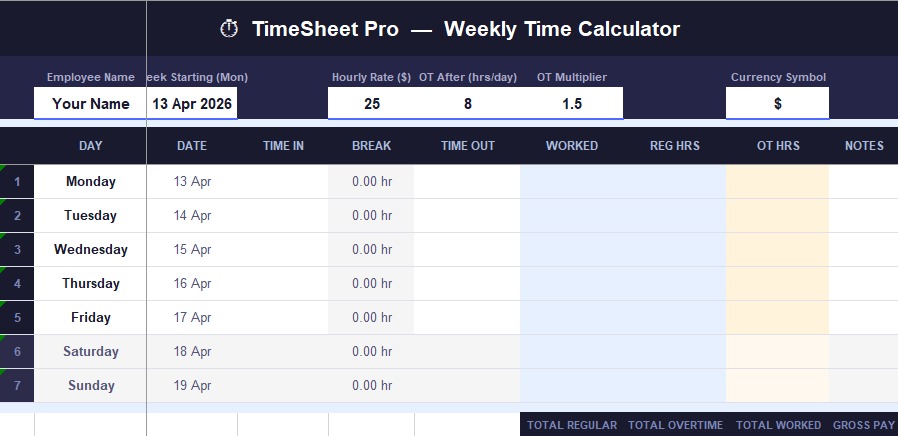
Getting started takes less than two minutes. Download the file, open it in Excel or Google Sheets, and enter four things once:
- Your name
- Your hourly rate
- Your overtime threshold (usually 8 hours)
- Your OT multiplier (usually 1.5x)
Everything else, hours, overtime, gross pay, calculates itself.
What Makes This Excel Time Sheet Template Different
There are hundreds of time sheet templates floating around online. Most of them are either too complicated or too basic to be useful. Time Sheet Pro sits right in the middle, clean enough to use without a tutorial, powerful enough to handle real payroll math.
Here’s what you get:
- Daily Time In / Time Out entry — simple columns, no confusion
- Automatic break deduction — enter break time in decimals (0.5 = 30 mins)
- Smart overtime calculator — respects your personal daily threshold, not a one-size-fits-all formula
- Regular pay + OT pay + Gross pay — all calculated automatically
- Monthly summary tab — see your complete earnings at a glance
- Notes column — add project codes or client names
- Print-ready layout — clean PDF export in seconds
No macros. No signup. No hidden anything.
How to Use Time Sheet Pro
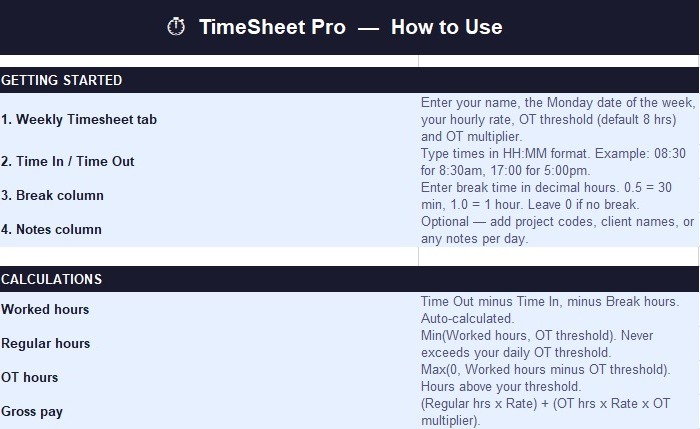
Step 1: Open the Weekly Timesheet tab. Enter your name, week start date, hourly rate, OT threshold, and multiplier, do this once and you’re set for the week.
Step 2: Each day, enter your Time In and Time Out in HH:MM format. Add your break time as a decimal.
Step 3: Watch the sheet calculate your worked hours, regular hours, and overtime hours instantly.
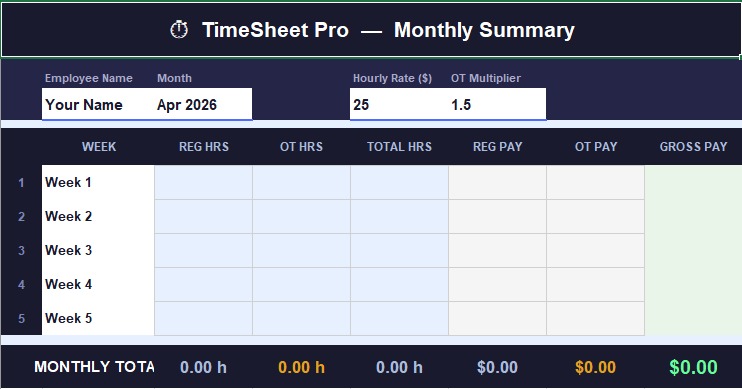
Step 4: At the end of the week, transfer your totals to the Monthly Summary tab for a complete monthly picture.
That’s genuinely it. No manual addition, no second-guessing.
How the Automatic Calculations Work
The math behind TimeSheet Pro follows standard US payroll rules:
Worked Hours = Time Out − Time In − Break Time Regular Hours = Hours worked up to your daily threshold Overtime Hours = Any hours above your threshold Gross Pay = (Regular Hours × Hourly Rate) + (Overtime Hours × Rate × OT Multiplier)
Every number updates the moment you enter your times. If you worked 9.5 hours with an 8-hour threshold at $18/hour with 1.5x OT, the sheet handles that math before you finish typing.
MONTHLY SUMMARY – Your Complete Payroll Overview
The Monthly Summary tab is where TimeSheet Pro really earns its keep. Instead of adding weekly totals by hand at the end of the month, just transfer each week’s numbers into the summary. The template automatically totals your:
- Regular pay for the month
- Overtime pay for the month
- Final gross pay
Clean, accurate, and ready to show your employer or keep for your own records.
TIPS & BEST PRACTICES
A few things that make a real difference:
- Always use HH:MM format for time entries — 08:30, not 8:30am
- Decimals for breaks work best — 0.25 = 15 min, 0.5 = 30 min, 0.75 = 45 min
- Save a blank master copy so you have a fresh template each week
- Use “Fit to One Page” when printing for a clean single-page timesheet
- Google Sheets users — just upload to Drive and open directly, all formulas work
Who Is This Time sheet Template For?
This Excel time sheet template is ideal for:
- Hourly workers who want to verify their paycheck before payday, especially in states like California where overtime rules are stricter than federal law.
- Freelancers and contractors who bill clients by the hour and need professional documentation.
- Small business owners managing a handful of employees who want something simple without paying for payroll software.
- Anyone who has ever thought “I think my hours are wrong this week”, this template removes that uncertainty.
Get Your Free Timesheet Template Today!
File size: ~15 KB | Compatible with Excel 2010 and above | Works perfectly in Google Sheets)
Frequently Asked Questions
Q: Is this Excel timesheet template really free?
A: Yes, completely free. No account needed, no email required, no strings attached.
Q: Will it work in Google Sheets?
A: Absolutely. Just upload the file to Google Drive and open it with Google Sheets. Every formula transfers perfectly.
Q: Does it calculate overtime automatically?
A: Yes, enter your daily threshold once & the template handles the rest, it automatically separates regular hours & overtime based on the threshold you set.
Q: Can I customize it for my own rate and rules?
A: Of course, The hourly rate, OT multiplier, and threshold are all editable fields. Adjust them anytime to match your situation.
Conclusion
Manual timesheet math is one of those things that feels fine until it isn’t, until you realize you’ve been shortchanged, or until a client questions your invoice. Stop wasting time on manual spreadsheets and risky calculations. Download the Time Sheet Pro Excel template today & make your weekly and monthly time tracking accurate, professional, and stress-free.
Time Sheet Pro takes that risk off the table. It’s free, it works in Excel & Google Sheets, and it does the math accurately every time.
Ready to simplify your payroll tracking?
Prefer online tool? Check our free online Time Card Calculator.
Related: Timesheet Templates | Free Time Card Calculator | Decimal Time Conversion | Time Card for Multiple Employees | 7 Minute Rule Explained
